
Super Morse: Eight Skins, Sixteen Filters, and the Process Behind Them
Published:
Post #45 in the Super Morse series. The previous post covered the proposed game economy. This one is about art: how the game gets a new look, and what that costs.
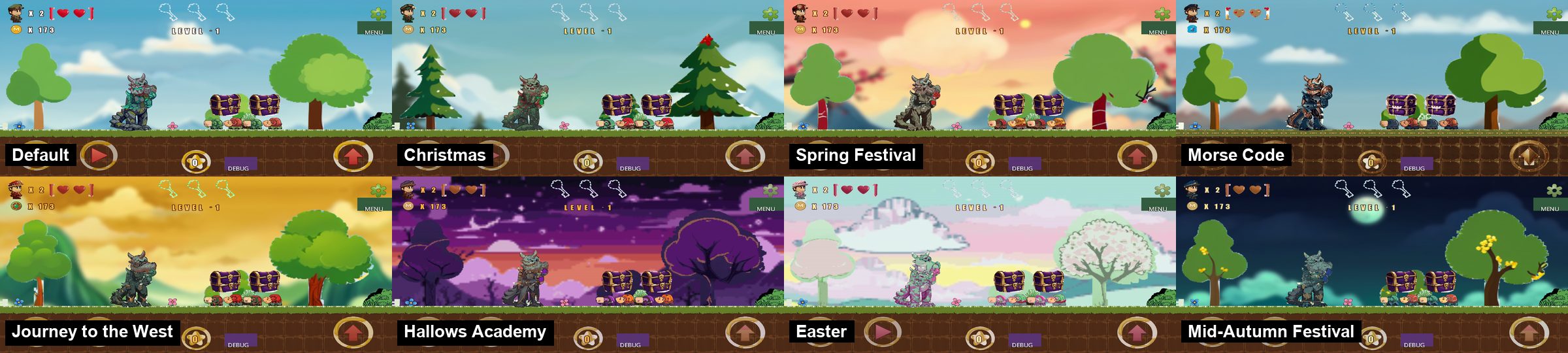
The forest scene in all eight skins.
TL;DR
- Eight skins ship: Default plus seven themes (Christmas, Spring Festival, Morse Code, Journey to the West, Hallows Academy, Easter and Mid-Autumn Festival). Each theme is an overlay pack of about 150 files (about 7 MB) on top of Default. Every file it leaves out falls back to Default.
- Shapes are frozen; pixels are not. Atlases, skeletons, region rectangles and every alpha silhouette stay exactly as they are. A skin only repaints inside them, so collisions and animations never change.
- A fixed process with exit checks: brief, theme entry, heroes first, creatures, drawn blocks and pipes, backdrops, graded UI, audio, then two audits that must report 0 problems, a phone check of every biome, and finally the owner’s sign-off.
- The cheap path is filters. Ten colour lookup tables (17 KB in total) and five frame effects give sixteen looks, and they work with every skin: 8 x 16 = 128 combinations. The HUD, the hero and hazards are never filtered.
Two ways to change the look
| Skin | Filter | |
|---|---|---|
| What changes | The art: characters, creatures, props, blocks, backdrops, HUD, fonts, audio | The world’s colours at draw time, through a shader |
| Cost | Days of generation, drawing, review and audits; about 7 MB | One 256 x 16 lookup image (about 2 KB), or one effect shader |
| Combines | With every filter | With every skin |
| Good for | A theme that needs new shapes: costumes, festival objects, motifs | A new mood for art that already exists: night, sepia, retro |
A skin is the expensive one, and most of this post is about doing it without breaking the game. Filters come at the end.
Layers
 ┌──────────────────────────────────────────────────────────┐
 │ HUD, controls, text, guide hand   (never filtered)       │
 ├──────────────────────────────────────────────────────────┤
 │ Filter: LUT shader or frame effect (hero, hazards exempt)│
 ├──────────────────────────────────────────────────────────┤
 │ Skin overlay pack: only the files that differ            │
 ├──────────────────────────────────────────────────────────┤
 │ Default: the base reskin, every file present             │
 └──────────────────────────────────────────────────────────┘
   Original art: never shipped, only the yardstick for audits
The game first ran on art it didn’t own. Default replaced every image and sound. It is the base every skin builds on, and the art you see when no skin is chosen. The original art is kept outside the shipped app, only so the audits can prove nothing from it is left.
A skin is an overlay pack. The asset loader checks the overlay first and falls back to Default, so a pack holds only final, changed files. The skin catalog lists every skin with a label, a short label for the level-select button, and a debugOnly flag. A skin stays debug-only until it is signed off.
The skins
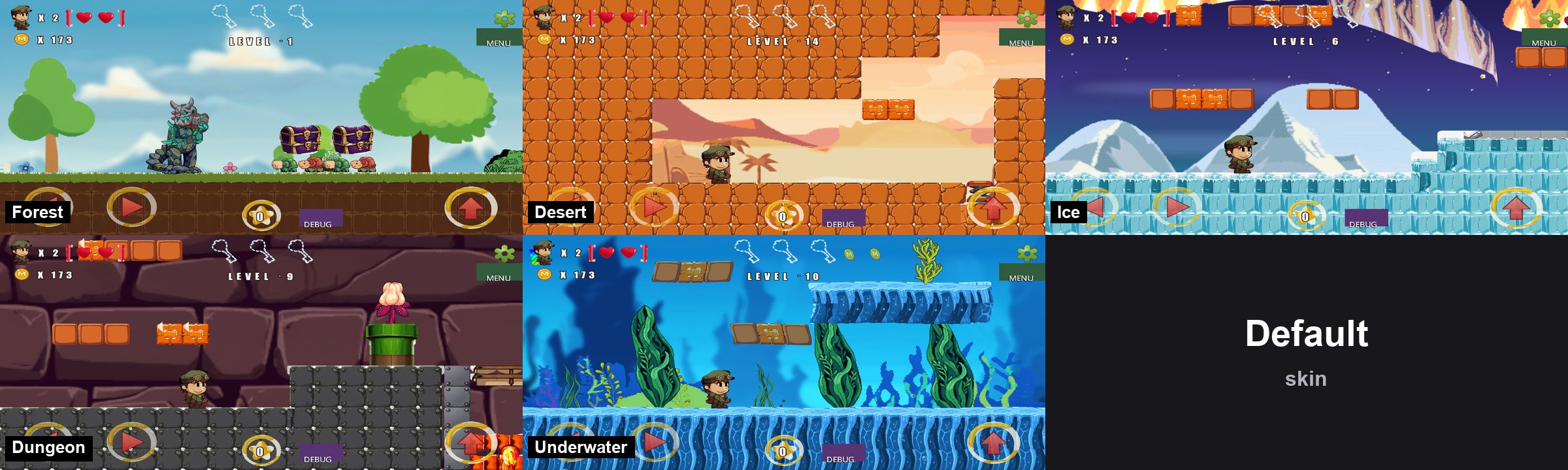
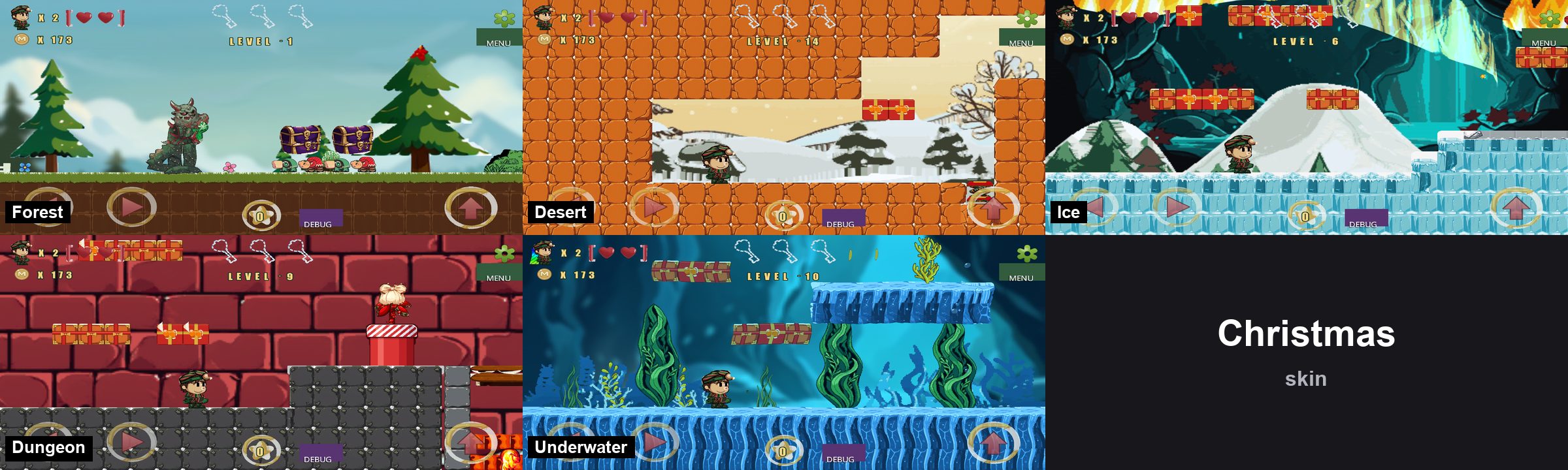
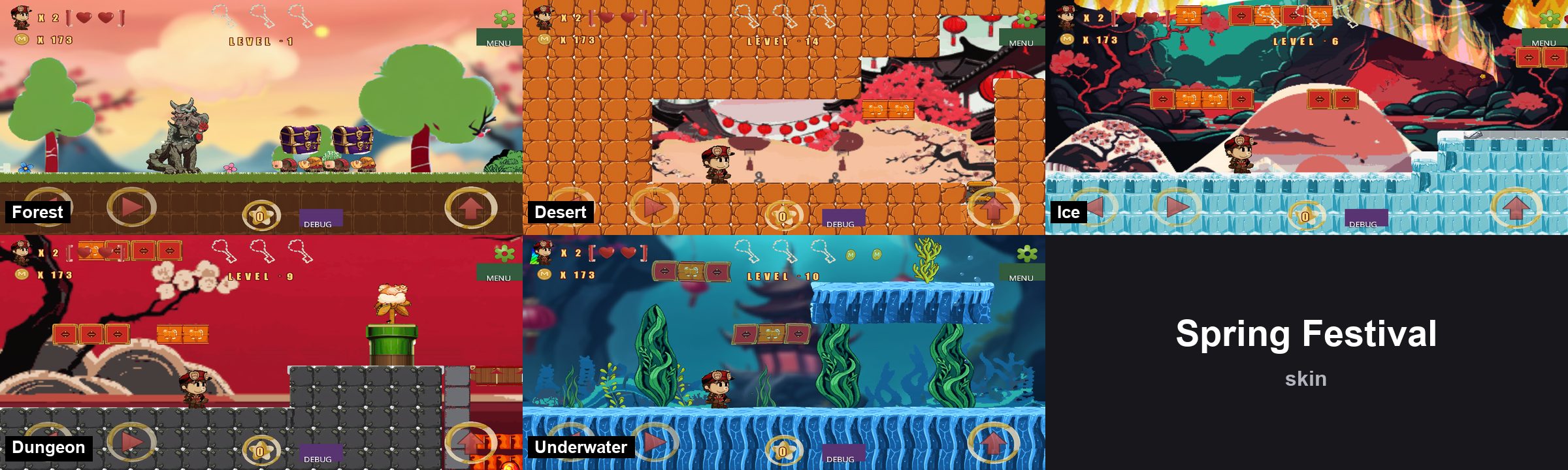
All screenshots were taken on a Solana Seeker phone, in five biomes: forest, desert, ice, dungeon and underwater. They come from the debug build, so a DEBUG button sits in the control row.
All forty screenshots: eight skins, five biomes each (about a minute).
Default
The base reskin: an explorer hero in green, painted forests, sandstone, ice caves and a coral sea.
Christmas
Snowy pines and snow-capped hills. Ribbon bricks and gift-box crates. Red pipes with a red-and-white striped lip that has an outline, so the entry reads at a glance.
Spring Festival
Red and gold, plum blossom, lanterns and couplets. The red dungeon wall and gold-trimmed blocks carry the festival into every biome.
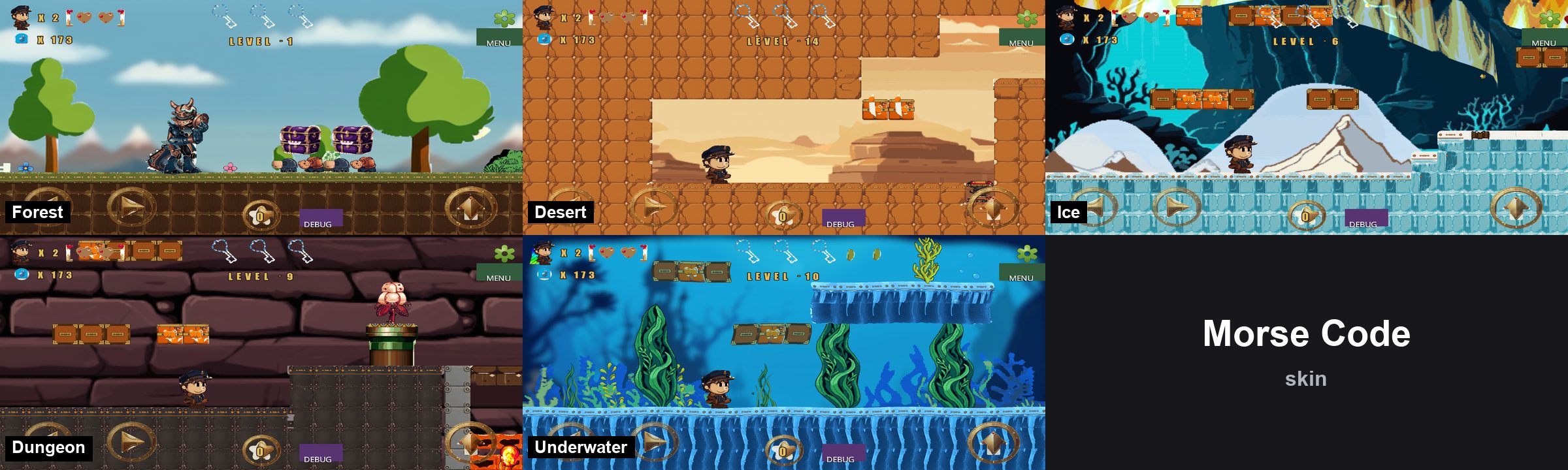
Morse Code
The game’s namesake: a telegraph-era look in navy and brass. It is the only skin that decorates the terrain itself, with a dot-dash plaque on the top layer only.
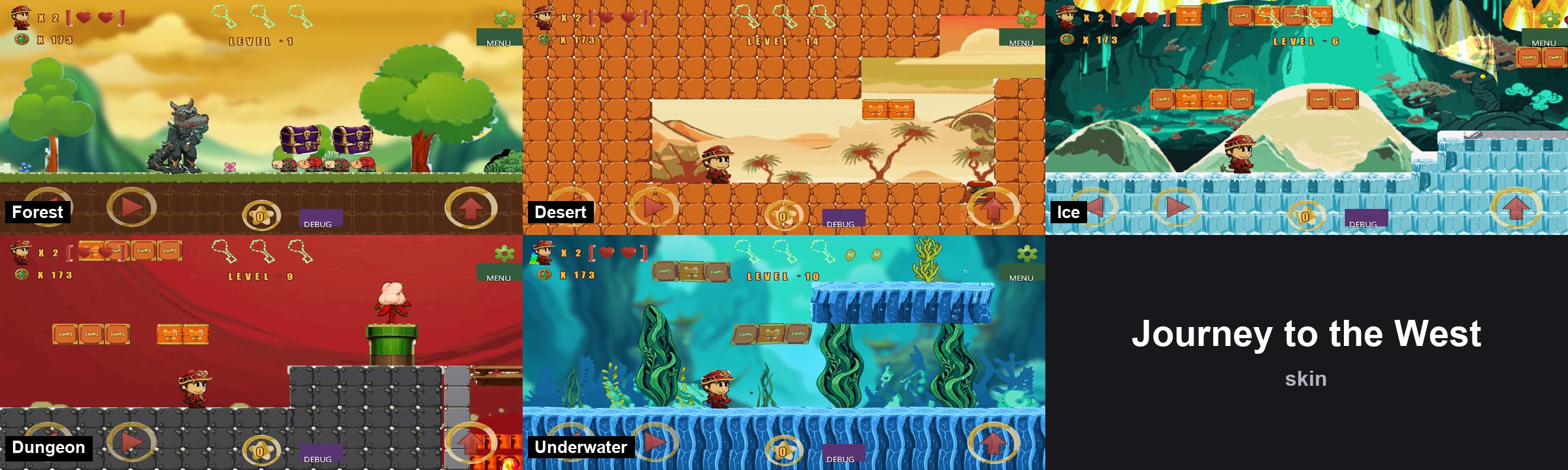
Journey to the West
A classical Chinese look: vermilion and imperial gold, golden skies and ink-wash hills.
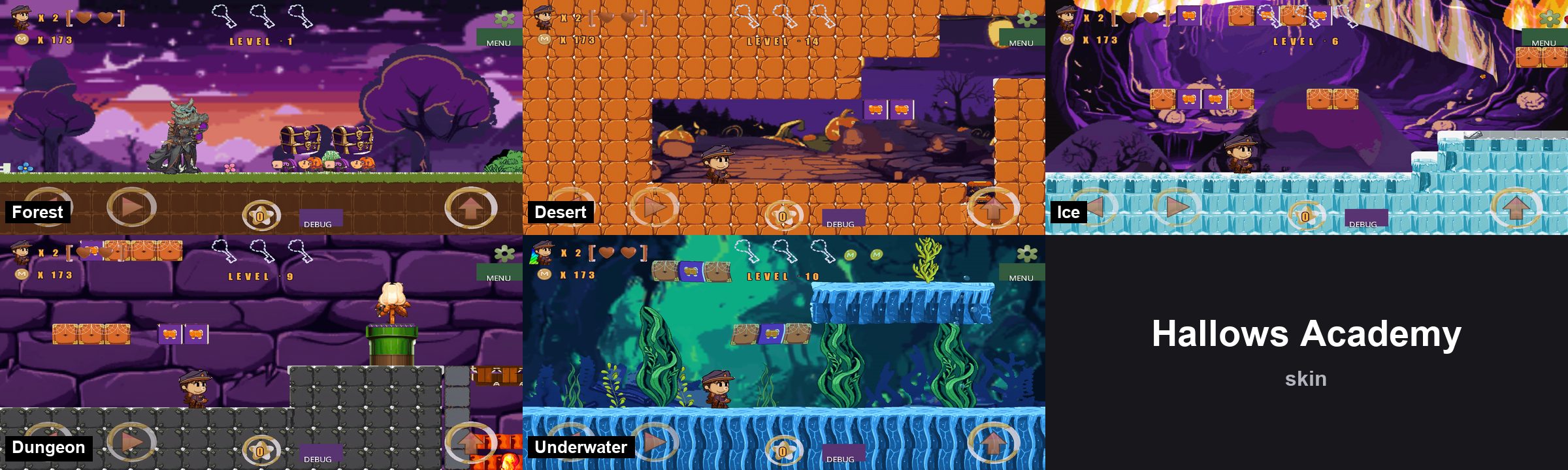
Hallows Academy
Halloween night at a witch academy: purple skies, crooked trees, cobweb bricks, spell-book crates, jack-o’-lantern blocks and rune-ringed pipes. It is a genre, not a franchise. More on that below.
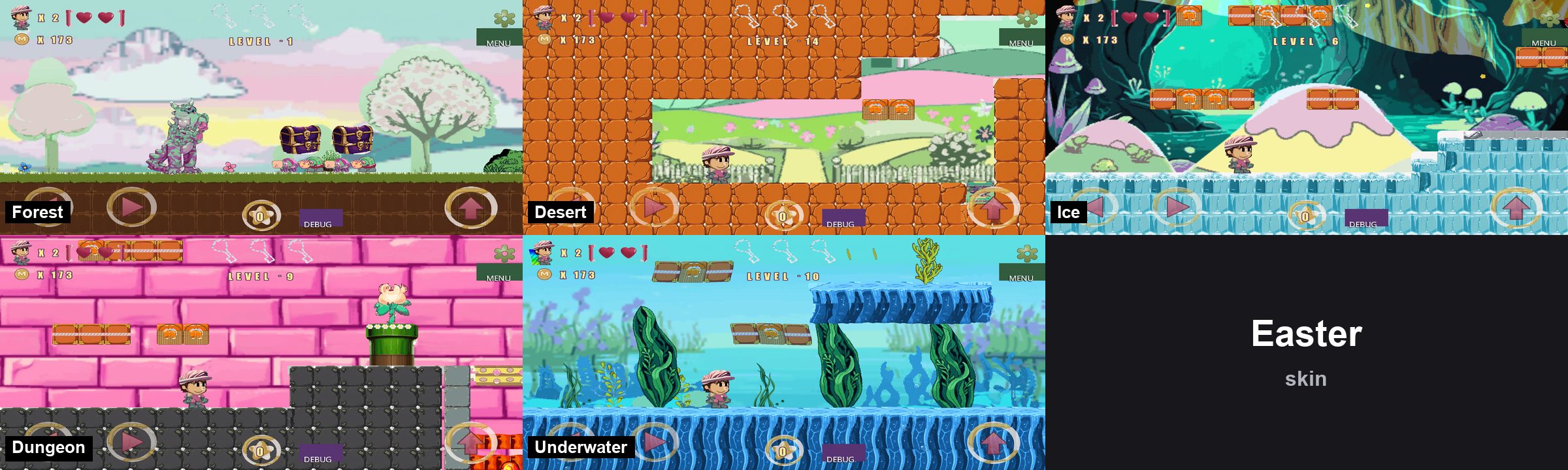
Easter
A secular spring theme: pastel skies, blossom, egg-banded bricks, basket crates, flower-collared pipes and a pink brick dungeon.
Mid-Autumn Festival
The newest one: an indigo night under a full moon, osmanthus trees, rabbit lanterns, pastry-box crates and mooncake seals.
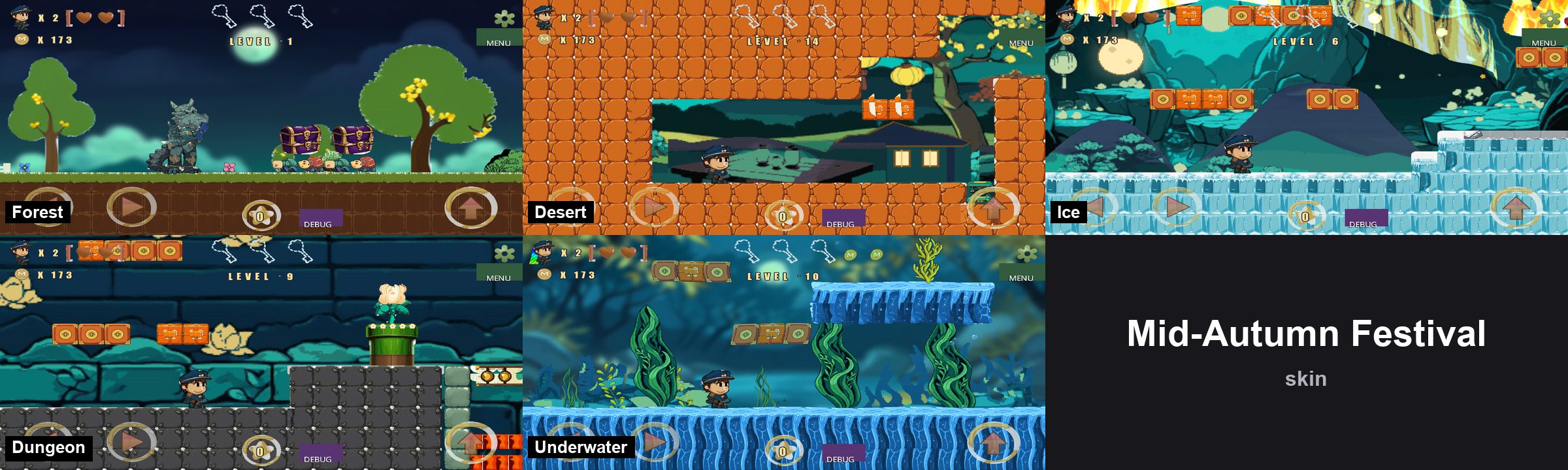
What a skin may change
- Frozen: atlas files, skeletons, page sizes, region rectangles, the alpha silhouette inside each region, timings. If a silhouette changed, the collision box and the animation would no longer match the art.
- Repainted: everything inside the silhouettes: costumes, motifs, backdrops, the HUD’s grade, fonts, audio cues.
- Left to Default on purpose:
- Hazards must look dangerous in every skin. One restyle turned fire spikes into harmless-looking rocks.
- Effects whose look is their meaning: smoke, bubbles, speed lines.
- Data markers.
- Story illustrations.
- Terrain tilesets, except in the Morse Code skin.
- No new third-party IP. A theme is a genre, never a franchise. Hallows Academy has pointed hats, owls and spell books. It has no famous school, house colours, crests or lookalike characters. Prompts describe materials, shapes and colours, never a franchise or a character name, because naming one makes the model reproduce it.
The process, step by step
Every step has an exit check. Each skin keeps a STATUS.md (what was done, what was seen on the phone) and a DECISIONS.md (why).
 brief ─► theme entry ─► one hero ─► nine heroes ─► creatures/props
   │                                                     │
   ▼                                                     ▼
 owner OK                       blocks/pipes (drawn) · backdrops · UI · fonts · audio
                                                         │
                                                         ▼
          install final pages ─► review sheets ─► theme audit = 0 ─► skin audit = 0
                                                         │
                                                         ▼
                      phone: every biome, HUD, hero select, revive ─► build + tests
                                                         │
                                                         ▼
                                 commit debug-only ─► owner sign-off ─► release
1. Brief
The brief has these parts:
- a theme;
- a five-colour palette (ink, main, second, accent, light);
- a costume brief for each of the nine heroes;
- the wording for monsters and props;
- motif names for blocks and pipes;
- two font colours;
- an audio cue set.
The owner approves it before any pixels are made.
2. Theme entry
The seasonal skins share one set of tools driven by one theme table. A new theme is mostly data: the palette, the briefs, the motif names. Each tool also has its own table: block motifs, backdrops, UI grade, cue set. A tool stops and names the missing table rather than quietly falling back to another theme. An early version fell back silently, and a third theme came out with Spring Festival art.
3. Heroes first
Heroes are generated one atlas region at a time with ComfyUI. Each part starts from a palette-recoloured version of Default’s art, with the hero’s brief and the part’s role (torso, sleeve, hat, boot). The result is clipped back to the region’s silhouette. We pose-render every animation clip without a phone and show one hero to the owner before doing the other eight.
The first attempt generated the whole atlas page as one picture. Every part then got an unrelated slice of one big image, so the heroes came out incomplete. One part at a time is slower but correct.
Faces are shared by every skin, so eyes, mouths, brows and noses keep Default’s pixels.
4. Creatures and props
A rig that is one material and one shape family can be generated a whole page at a time, about ten times cheaper. A rig whose silhouette is the joke, like a puffer fish’s spines or a frog’s shape, has to go part by part, or the frog turns into jade bowls. Creatures told apart only by colour, such as green and red turtle shells or the three mounts, must keep those colours.
5. Draw what models can’t
Some things are drawn in code rather than generated:
- Blocks and crates. Diffusion on flat faces that tile does nothing at low strength and breaks the shape at high strength. Motifs are drawn, and block types keep their colours so they stay distinguishable.
- Pipes and pillars. These are stacked from repeated tiles. Decoration on every tile made them look like short pipes piled on each other. Now the body is one smooth column and only the top is decorated.
- Letters and digits. Exactly two colours, one flat fill and one dark outline. A model’s mixed-colour digits were hard to read on screen, so they were redrawn.
- Thin line art such as webs and thin bands on a hat brim. Models turn strands into noise.
6. Backdrops, UI, audio
Backdrops use masked generation, one at a time. Each gets its own drawn outline (hills, trees, islands, clouds) over a sky context. The UI is graded, not regenerated, because one cell can serve several buttons. Audio cues are generated, decoded, peak-checked, and shipped only if they really differ from Default.
7. Install and review
Only final pages go into the overlay. A cleanup once found 234 raw generator files and 79 masks inside the APK. Then come Default-vs-new review sheets for every class (heroes, creatures, props, mounts, blocks, backdrops, UI, fonts), checked cell by cell by someone other than the generator.
8. Two audits that must say 0
The theme audit compares the overlay with Default:
- the alpha of every page must be identical;
- each page stays within its colour budget.
The skin audit compares Default and every overlay with the original art:
- no original art is still shipped;
- no blank or flat region in anything the game draws;
- no opaque pixel outside the original silhouette;
- no page size change;
- overlay hygiene: no leftovers, no copies of Default.
Comparing only with Default would miss what Default itself lost. Deliberate exceptions go into an accepted list with a reason.
One audit finding taught a rule that is easy to miss. When Default is fixed later (a face, a pointing hand), every overlay holding its own copy of that page must get the fix too. Otherwise older skins keep the old defect. A small sync tool now carries such fixes across skins, recolouring a costume region into each skin’s palette.
9. Phone check
The skin is launched on the phone in one scene per biome, with the HUD, hero select, level select, revive, the guide hand and the pickup digits. The phone is someone’s personal device, so the checks follow strict rules:
- one agent holds a per-device lock;
- a foreground gate refuses to act over another app;
- installs use
install -r; - no force-stops;
- no ads, purchases or paid revives are ever tapped.
Taking the screenshots for this post was a phone check of its own. Switching skins without restarting the app crashed it: the overlay lookup cached “is this file in the overlay?” by path alone. One skin’s answer leaked into the next, and the app tried to load a page that only the earlier skin had. The cache is now keyed by skin and path.
10. Release
Build and unit tests pass, and the skin is committed while still debug-only. The owner checks the open items on the phone (audio by ear, revive, the guide hand) and signs off. Only then does debugOnly become false.
The cheaper path: filters
A full skin costs days. Often what you want is a different mood for art that already exists: the same level at night, an old-photograph look, a retro mode. That is a shader’s job, not an artist’s.
One Mid-Autumn Festival scene under every filter.
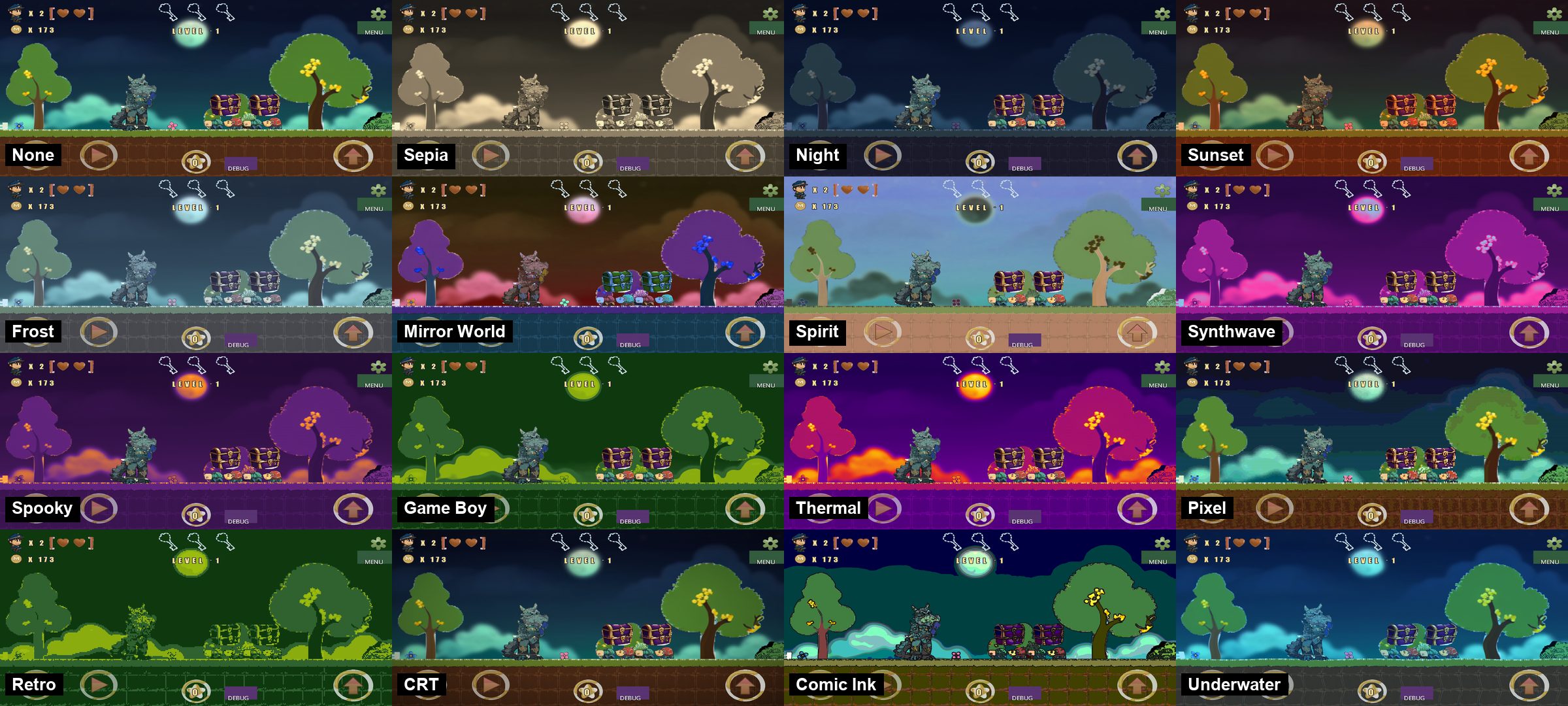
Colour filters: lookup tables
Any colour filter, however it was designed, can be baked into a 3D colour lookup table: a 16 x 16 x 16 colour cube laid out as a 256 x 16 image. You run the filter once over an identity table and ship the result. The shader doesn’t need to know what the filter is:
// strip layout: x = blue slice * 16 + red, y = green; the two blue slices around the colour are blended
vec3 lookUp(vec3 c) {
  c = clamp(c, 0.0, 1.0);
  float b = c.b * 15.0;
  float b0 = floor(b);
  float b1 = min(b0 + 1.0, 15.0);
  float x = c.r * 15.0 + 0.5;
  float y = (c.g * 15.0 + 0.5) / 16.0;
  vec3 s0 = texture2D(u_lut, vec2((b0 * 16.0 + x) / 256.0, y)).rgb;
  vec3 s1 = texture2D(u_lut, vec2((b1 * 16.0 + x) / 256.0, y)).rgb;
  return mix(c, mix(s0, s1, b - b0), u_strength);
}

void main() {
  vec4 c = v_color * texture2D(u_texture, v_texCoords);  // vertex colour kept: flashes and fades still work
  gl_FragColor = vec4(lookUp(c.rgb), c.a);
}
Ten tables ship: sepia, night, sunset, frost, mirror world, spirit, synthwave, spooky, Game Boy and thermal. 17 KB in total.
Frame effects
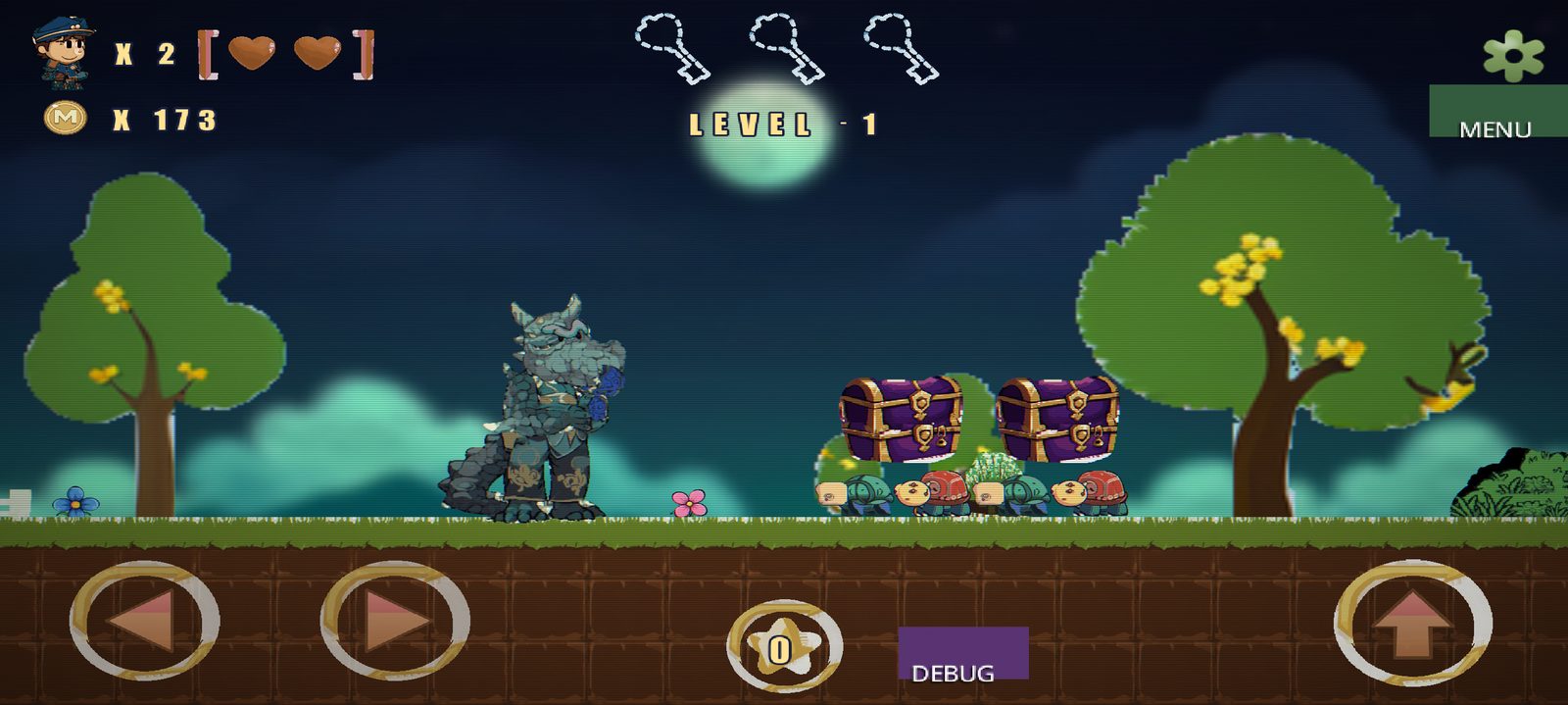
Effects that look at neighbouring pixels or screen position can’t be a lookup. For these, the world is drawn into a frame buffer and redrawn through an effect shader: pixel, retro (pixels plus the Game Boy palette), CRT, comic ink and underwater waves.
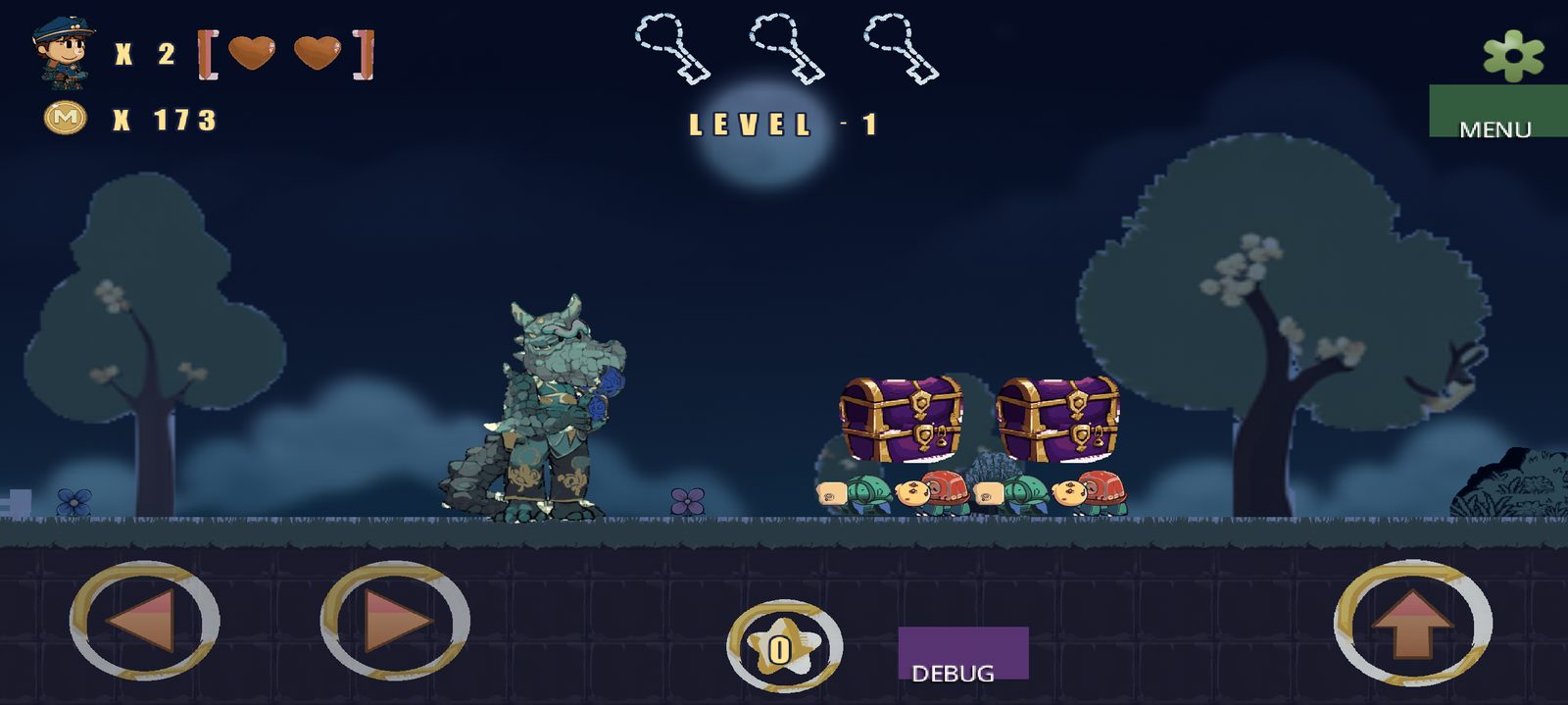
| Night (scenery only) | CRT |
|---|---|
 |  |
| None | Comic ink |
|---|---|
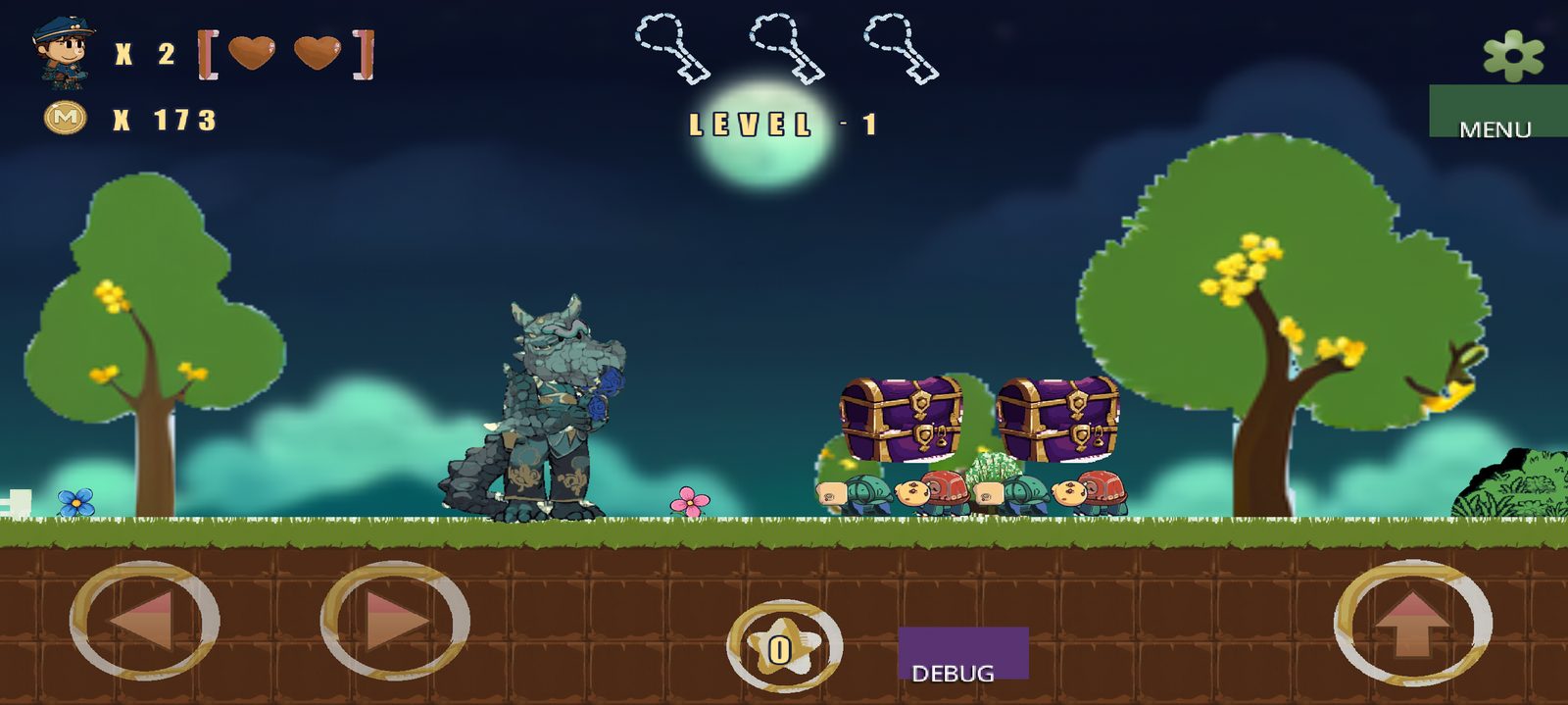 | 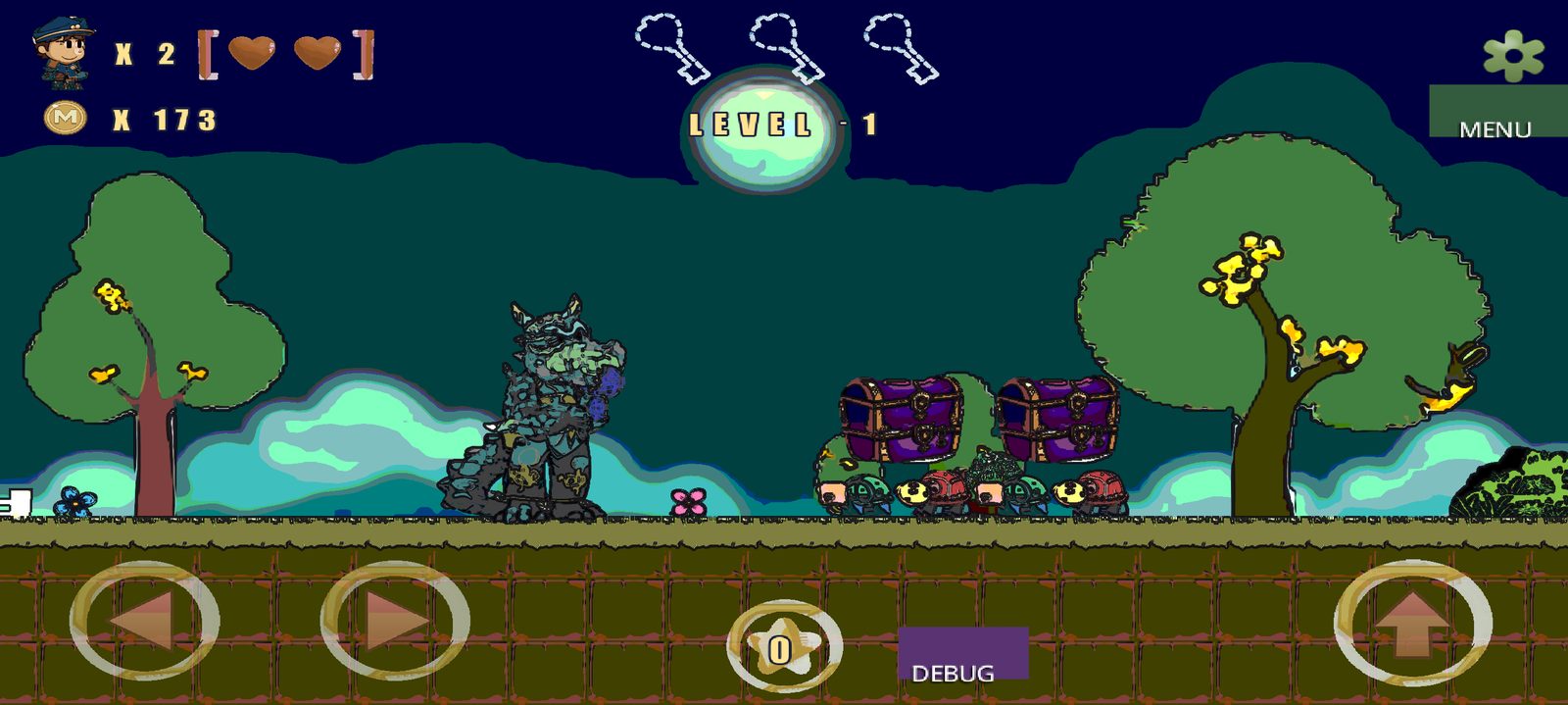 |
Filter rules
- The HUD, controls, text, guide hand and revive bubble are never filtered. They are drawn after the world already.
- The hero and hazards are never filtered. Under a frame effect they are held back and drawn after it. The player must always find themself, and lava must always look like lava.
- Filters that hide gameplay are scenery-only. Night, spooky, Game Boy, thermal and spirit filter the backdrop and terrain but not the enemies and coins.
- Visual only. Distortion stays a few pixels, so what you see still matches where things collide.
On the Seeker every filter and effect runs at the same frame rate as none.
Skin or filter?
- Need new shapes? A festival’s objects, costumes, a theme people will recognise: make a skin.
- Need a new mood? Night, retro, sepia, a special mode, a power-up moment, colour-blind assist: make a filter. It costs a few KB and works with every skin, including skins that don’t exist yet.
What’s next
- Seasonal rotation: turning skins on around their festivals.
- Filters by situation: underwater waves in water sections and a short synthwave burst during star power are already in. More can be tied to levels or rewards.
- Accessibility: colour-blind and high-contrast modes, using the same lookup-table path.
- The external IP review before public release.
Conclusion
Eight skins look like a lot of art. The real work was the process around them:
- frozen shapes, so the game never notices a skin;
- overlay packs that hold only what changed;
- two audits that must say zero;
- a phone check per biome;
- a sign-off before release.
Filters turned out to be the bargain of the project: sixteen looks for 17 KB of lookup tables and five shaders, on top of every skin.
Related Posts
- Super Morse: A Proposed Game Economy and Its Reference Implementation: where skins may fit as rewards
- Super Morse: Game Architecture, Engine 2 Integration and Debug Tools: the debug tools used for the scene tests above
Connect
- GitHub: guidebee
- LinkedIn: James Shen
This is post #45 in the Super Morse series. Eight skins, sixteen filters, and a process with two audits that must say zero.