
Reviving iRobot: An Old Android Project, Six Years Later, With AI Agents as Co-Developers
Published:
TL;DR
- iRobot is a project I started six years ago and shelved: a C++ rewrite of scrcpy that drives real Android devices over ADB and exposes that control to AI agents as two plain TCP sockets — one streaming frames out, one taking actions in.
- I picked it back up last week, after moving to Melbourne and finally having a quiet weekend for the first time in months.
- This time the difference wasn’t the idea — it was who was doing the work. Claude Code and GitHub Copilot rewrote the core in C++23, built an entire desktop authoring tool (the Gym IDE) from scratch, and even helped draft and self-critique the design doc for where the project goes next.
- I still make every call on direction and scope — what gets built, what gets rejected, what stays out of the runtime loop — but the volume of work one evening can now produce is not comparable to six years ago.
A Project I Started Six Years Ago — and Left Unfinished
I started iRobot six years ago, when the idea of driving an Android device programmatically — for testing, for automation, eventually for training an RL agent to play mobile games — felt like something worth building from scratch. I forked scrcpy, Genymobile’s excellent screen-mirroring tool, and spent a couple of good years, on and off, bolting an agent-facing control layer onto it: the ADB plumbing, an early version of the agent sockets, enough of a working foundation that it was never just an idea on paper.
It wasn’t abandoned in one moment — it got worn down gradually, the way most unfinished side projects are. Work, a couple of job changes, my father’s illness, our move to Melbourne — one thing after another kept landing on top of it, until eventually the repository just sat untouched for years. Not abandoned in spirit, just permanently below the waterline of everything else that mattered more.
Last week, for the first time in a long while, I had a free weekend with nothing urgent pulling at it. I opened the old repo expecting to spend most of my time just remembering what I’d built. Instead I ended up rebuilding and extending most of it in a few sessions — because this time I wasn’t doing it alone.
Why iRobot, Not the Trading System
Readers of this blog will know I’ve spent most of this year deep in a Solana trading system — four intense, AI-assisted months, documented across more than thirty posts here. It’s worth being honest about why that project is the one sitting quiet right now, while iRobot is the one that got my free weekend.
It comes down to the same thing that stalled iRobot the first time, plus two things specific to this stretch. Too much happened in too short a window — my father’s illness through the first half of the year, then the move to Melbourne and starting a new job — and carrying a demanding side project through all of that stopped being realistic. On top of that, the crypto market cooled off considerably over the same period; the arbitrage margins that made the system interesting to keep pushing on got thin enough that the evenings stopped feeling worth it, at least for now. And practically: some of the hardware the trading rig ran on didn’t make the move to Melbourne with me, so picking it back up isn’t just re-opening the repo — there’s a hardware gap to close first too.
iRobot needed none of that. A laptop and an Android phone were enough to get going again, and it scratches the same kind of technical itch the trading system did, just in a different domain. When a quiet weekend finally showed up, this is where it went.
What iRobot Actually Is
The core idea hasn’t changed since six years ago: a real device, not a simulator. iRobot pushes an unmodified server APK to a physical phone, tablet, or emulator over ADB, captures its screen as an H.264 stream, and relays input events back — the same mechanism scrcpy uses for its mirror window. No root access, no on-device agent code, nothing about the target app needs to know it’s being driven by anything other than a finger.
What I originally set out to add — and what now actually exists — is a layer called AgentManager sitting alongside the human mirror window: two always-on TCP sockets that let an external program watch the screen and act on it, independent of whether anyone is looking at the mirror at all.
Android Device                       Desktop (iRobot)
──────────────                       ────────────────
 irobot-server (APK)  ──H.264──►  VideoStream → Decoder → Screen (human mirror)
                      ◄─Control─  Controller  ← InputManager ← human input
                                                     │
                                              AgentManager
                                           ┌──────┴──────┐
                                     AgentStream     AgentController
                                     (frame + phash  (JSON control
                                      → AI client)    ← AI client)
                                           └──────┬──────┘
                                                   │  TCP (JSON in / binary frames out)
                                          external AI agent
Every frame handed to an agent arrives pre-processed: a downscaled grayscale frame, a small color thumbnail, and an OpenCV perceptual hash for each — so a cheap decision loop can ask “did anything change on screen” without ever touching raw pixels. Every control event, human or agent-originated, can be recorded to events.json with a single keystroke and replayed later — a direct path to dataset collection or imitation learning.
None of that description is new — it’s roughly what I sketched out six years ago. What’s new is that it’s actually built, tested, and has a desktop tool sitting on top of it.
The Gym IDE: Teaching a Bot to Play a Game, By Hand First
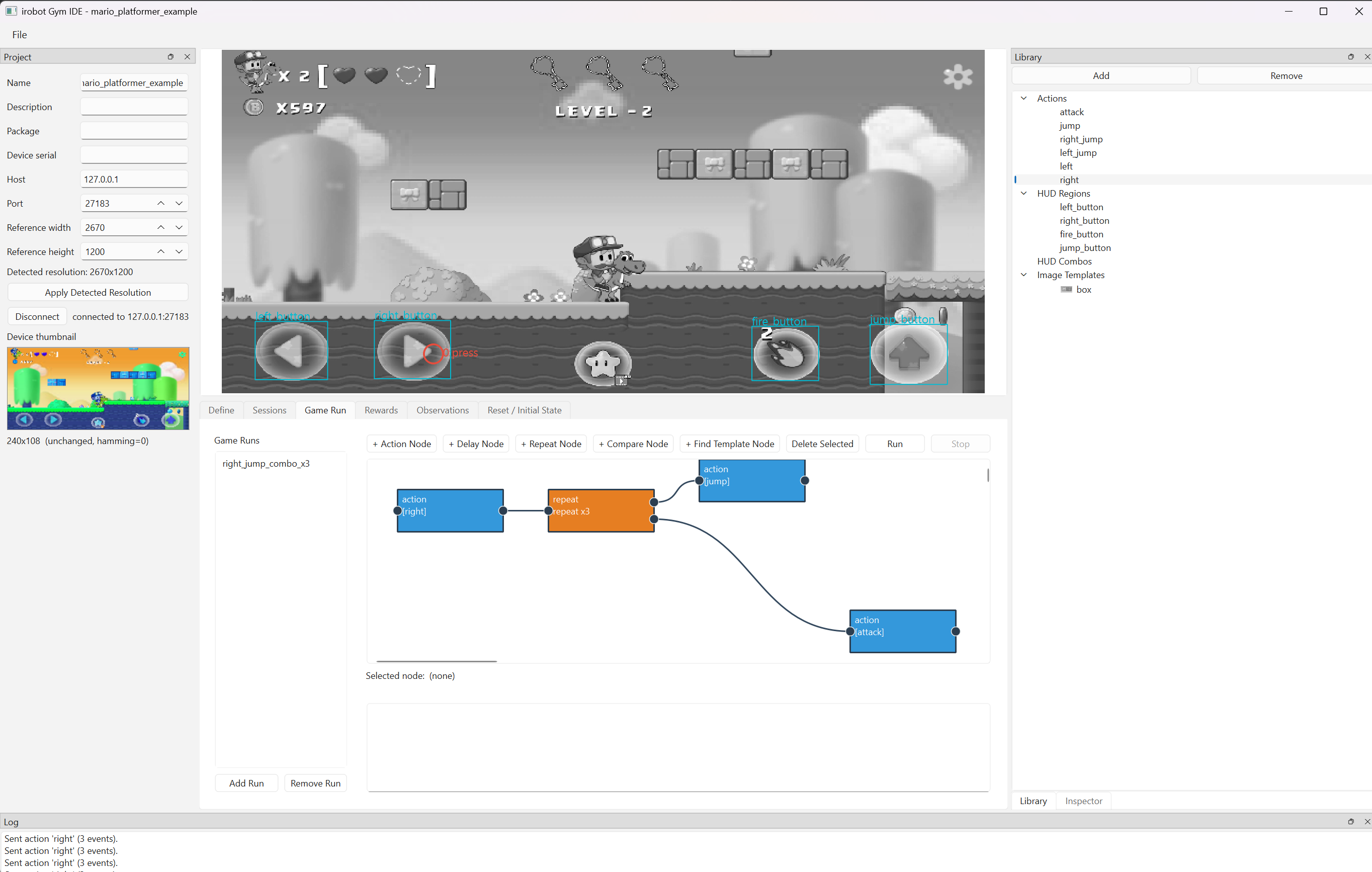
The most substantial piece to come out of last week is the Gym IDE, a PySide6 desktop app for turning raw device input into a reusable, testable action vocabulary — no training code required to get started:
- Define actions — click on the live mirror to place touch events, combine them into named actions (a tap, a held d-pad direction, a jump-then-move combo), test each against the real device.
- Script a Game Run — a node-graph editor: drag Action, Delay, Repeat, Compare, and Find-Template nodes onto a canvas, wire them together into a branching sequence, and click Run to replay that graph against a live device and auto-play the game.
- Record and classify real gameplay — capture raw touches straight off the device, or a whole playthrough, and classify it against on-screen regions into named actions automatically.
The node-graph editor is the part I’m proudest of, because six years ago it wasn’t even on the drawing board — it’s the kind of “nice to have, someday” feature that never survives contact with limited weekend hours. This time it went from nothing to a working five-node-kind editor, with a full user guide, validation warnings, and a project.yaml file format, in a single sitting.
The Gap I Found Almost Immediately
As soon as I tried scripting something more ambitious than a fixed combo — getting a Mario-like platformer character through a level rather than just mashing a memorized sequence — the five original node kinds (Action, Delay, Repeat, Compare, Find Template) hit a wall fast:
- No data flow between nodes. Find Template already computes where something is on screen, but nothing routes that position into a downstream Action’s tap coordinates — every action’s coordinates are frozen at design time.
- Compare/Find are binary, not classifying. A real level has several obstacle types in play at once (gap, stairs, enemy, pipe). Scripting “which of these am I looking at” meant chaining separate Compare nodes with no single N-way dispatch.
- No reusable sub-graphs. Every recurring maneuver — climb stairs, stomp an enemy — had to be rebuilt node-by-node everywhere it recurred.
- No variables. A 3-step staircase and a 5-step staircase needed two separately hand-built graphs.
- No way to interrupt a long loop when a condition changes mid-run, short of hand-wiring a check into every single iteration.
This is exactly the kind of gap that used to mean weeks of design churn before I’d feel confident enough to start coding. Instead, I worked through it as a design conversation, and what came out the other end is a genuine design document — GAME_RUN_AI_ASSIST_DESIGN.md — proposing three new node kinds (Condition, Call-Run, Classify) plus one new edge (watch, giving Repeat an interrupt/while-loop capability) on top of the existing five.
Designing With AI — and Still Saying No to It
What surprised me most wasn’t the speed of implementation. It was how well the design phase itself held up under pressure when I pushed back on it.
The doc doesn’t read like a spec handed down whole — it reads like a working conversation. It has a section titled “Node-kind count: merges considered and rejected,” where a proposal to collapse Compare and Classify into one node (same underlying comparison logic, just N=1 vs. N>1 templates) gets seriously argued for and then explicitly rejected — not on implementation cost, but because a node whose port count silently changes shape is a worse reading experience on a canvas that deliberately color-codes node kinds for at-a-glance meaning. A second proposal — folding Find Template and Classify into one node with three configuration toggles — gets rejected even harder, as “exactly the premature abstraction this codebase’s own conventions warn against.”
There’s also a self-critique baked into the Condition node’s own design: an early version of it needed five property-panel fields, which quietly undercut the very argument used to reject a free-text formula field in favor of dropdowns in the first place. The fix — progressive disclosure, showing only the common three-field case by default — reads like something I’d catch in a second design-review pass. Here it happened in the first one, because I could iterate on the reasoning out loud instead of just the code.
That collaborative back-and-forth is also where the project’s most important architectural boundary got drawn, and it’s one I insisted on rather than one that emerged by default:
Keep AI out of the live control loop. A vision-model round-trip is tens to hundreds of milliseconds slower than a platformer’s jump-timing tolerance, and it makes replays non-reproducible — the opposite of what this tool is for.
So AI’s job in iRobot is strictly design-time co-author, never runtime controller:
- Demo + AI segmentation — record a human playing a maneuver once, feed the raw event trace and before/after frames to a vision-capable model, and get back a proposed parameterized subgraph using the new variable syntax. Never auto-committed — always shown on the canvas for a human to edit, rename, or discard.
- A point-to-point planning MCP tool,
design_action_sequence— given a start position, a goal position, a captured frame, and the project’s own list of available actions, a model reasons about the terrain between the two points (“there’s a gap around x=550–700; insertlong_jump”) and returns aGameRunfragment in the same schema a human would hand-author. It gets validated with the exact sameGameRun.validate()a hand-typed typo would hit, before a human ever sees it.
Both entry points end at the same gate: a human reviews and accepts before anything reaches project.yaml. A wrong AI suggestion costs a rejected diff, never a broken live run.
What Actually Changed Since Six Years Ago
Six years ago, this project stalled the way most solo side projects stall: not for lack of a good idea, but because turning “wouldn’t it be nice if a node graph could branch on a Condition and call reusable sub-runs” into working code, tests, and documentation was simply more hours than I had in a given month.
This time:
- Claude Code did the C++23 rewrite of the core mirroring/control pipeline, including the
AgentManagersocket layer and the perceptual-hash frame pipeline. - It built the entire Gym IDE — a PySide6 desktop app with a canvas editor, port-based node wiring, validation, and a YAML project format — largely unattended, checked in working increments.
- GitHub Copilot picked up the smaller, repetitive edges — boilerplate, straightforward pattern completions — the same cost/complexity split I’d already settled on for the Solana trading system.
- The design document above — arguments, rejected alternatives, self-critique included — came out of a genuine back-and-forth, not a one-shot prompt.
This isn’t a different approach from the one I wrote about for the trading system — it’s the same one, pointed at a different codebase. The methodology I described there — specialist skill roles instead of one generic assistant, a persistent memory that carries architectural decisions across sessions instead of re-explaining context every time, treating a design doc as something to argue with rather than accept — transferred over almost without modification. iRobot got its own version of it: a C++ role for the mirroring/agent core, a Python/PySide6 role for the Gym IDE, and the same habit of writing down forbidden patterns and constraints explicitly rather than hoping a vague prompt produces the right code. What changed was the domain, HFT arbitrage to Android automation. The working relationship didn’t.
What didn’t change: I’m still the one deciding what iRobot is for, which of the proposed node kinds actually ship, and where the hard boundary goes between “AI helps design this” and “AI never runs this live.” That judgment call — keeping AI out of the runtime loop specifically because it would make replays non-reproducible — is exactly the kind of decision that has to come from understanding what the tool is for, not from what’s technically possible to build next.
The heavy lifting moved. The direction didn’t.
What’s Next
The suggested build order in the design doc is deliberately incremental, and I’m following it:
- Variables + coordinate binding — the prerequisite everything else depends on.
- Condition node — turns a found position into a branch.
- Call-Run node, with declared parameters — the reuse primitive, validated against a human-built obstacle library before any AI involvement.
- Classify node — the N-way dispatcher that makes a library of reusable Runs actually useful in a real run.
- Repeat’s
watchedge — the interrupt primitive, whenever a real authored run needs it. - The AI-assist workflow itself — starting with the human-in-the-loop review UI, since both AI entry points share it.
Further out, the same two agent sockets are the intended foundation for an OpenAI Gym / Gymnasium-compatible Env, designed against a point-by-point comparison with DeepMind’s AndroidEnv — so existing RL tooling could eventually train against real Android games through iRobot rather than a simulator. That’s still exploratory, not a committed timeline.
It wouldn’t be the first Gym environment I’ve built, either. A while back I put together the Australia ASX Gym Environment — an OpenAI Gym-compatible virtual stock exchange wrapping ten years of real ASX market data across roughly 2,000 listed companies, built for training RL trading agents rather than playing games. Different domain, same shape of problem: wrap a real, messy source of observations and actions behind a clean Env interface that existing RL tooling can just plug into. Having already done that once is part of why the Gym/Gymnasium roadmap for iRobot doesn’t feel like unfamiliar territory.
Conclusion
I don’t think the interesting story here is “AI wrote my code.” It’s that a project which died from lack of hours six years ago is alive again because the hours I do have now go further — and because having an AI agent to argue a design with, not just generate code for, turned out to matter more than raw typing speed. I’m still the one who has to know what I actually want iRobot to become. I just don’t have to build all of it alone anymore.
Related Posts
- How I Built a Solana Trading System with AI as My Co-Developer — the same AI-assisted methodology, applied to a very different domain
- A New Chapter: First Day in Melbourne — the move that eventually freed up the time for this
Technical Documentation
- iRobot repository
- Game Run Editor — User Guide
- Game Run AI-Assist Design (in progress)
- scrcpy — the original project iRobot is built on
- Australia ASX Gym Environment — an earlier OpenAI Gym environment I built, for training RL agents against real ASX stock market data
Connect
- GitHub: guidebee/irobot
- LinkedIn: James Shen
This is post #35. What started as a Solana Trading System development log has grown into something broader: this blog now follows AI-native development in general — AI agents, AI-assisted engineering, and the tools and workflows that come with building this way — wherever the current project happens to be. Same throughline either way: AI agents doing the heavy lifting, a human still deciding what’s worth building.